How Smart Visitor Management Software Connects Access Control, HRMS, and Meeting Rooms

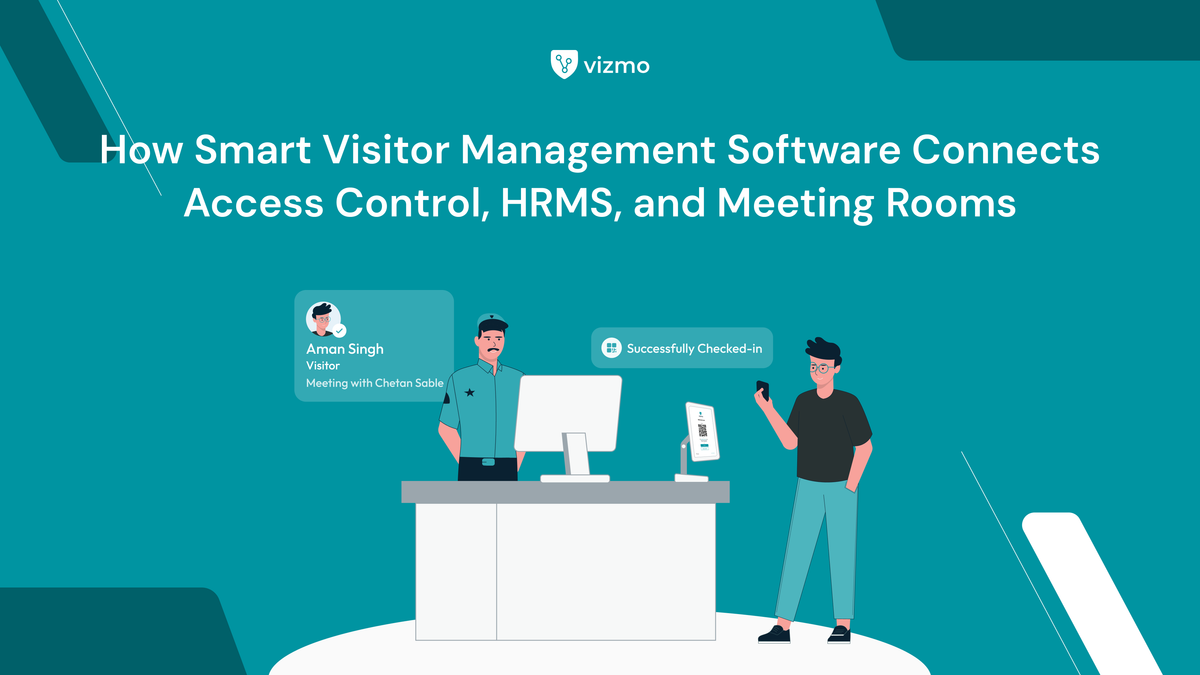
Picture this: a vendor arrives at the gate of a 10-floor corporate campus in Bengaluru for a 10 AM meeting. The host is on a call and hasn't been notified. The meeting room is double-booked because the previous occupant ran over. And the temporary access card for the vendor hasn't been issued yet because the security team is waiting on confirmation from the front desk — who is waiting on the host.
Three systems, zero coordination. The vendor waits. The front desk scrambles. The meeting starts 25 minutes late.
This is a daily reality for facility managers, IT heads, and admin teams at multi-floor offices and enterprise campuses managing 100 or more visitors every day. The individual tools — access control, HRMS, meeting room software — all work. They just don't work together. And the gap between them is where operational breakdowns happen.
Smart visitor management software closes that gap.
What Is Smart Visitor Management Software?
Smart visitor management software manages the complete visitor journey — from pre-registration to exit — and connects with access control, HR, and meeting room systems so each step in that journey triggers the next automatically. The visitor checks in, the host is notified, the access badge is activated, and the meeting room is confirmed — without anyone manually coordinating between three separate platforms.
It is the difference between a visitor management system that logs entries and one that orchestrates the entire visit — before the visitor arrives and after they leave.
What Actually Breaks When These Systems Are Siloed
Most corporate offices have each of these tools in place. The problem is isolation. When visitor management, access control, and HRMS run independently, the handoffs between them rely entirely on manual action — and manual action fails under volume.
- Visitor arrives, host isn't notified — the front desk calls the host manually, the visitor waits, and if the host is unavailable the situation has no automated fallback
- Access card issued without an HRMS check — a contractor whose engagement ended three months ago is still in the system and gets entry because no one revoked the credential
- Meeting room booked but visitor never shows — the room stays blocked for an hour while other teams wait, because there's no trigger to release it on a no-show
- No single audit log — when a compliance audit asks for visitor records, the data is split across three platforms and has to be manually compiled
- Vendor access granted beyond permitted zones — without access control integration, temporary badges have no zone restrictions and movement goes untracked
For enterprise campuses and IT parks managing contractors, vendors, and guests simultaneously, these gaps aren't occasional inconveniences — they are daily friction with real security and compliance implications.
How Vizmo Connects Access Control, HRMS, and Meeting Rooms
Vizmo Workplace is built around the idea that visitor management should be the connective layer between the systems already running in your office — not another standalone tool that adds to the coordination problem.
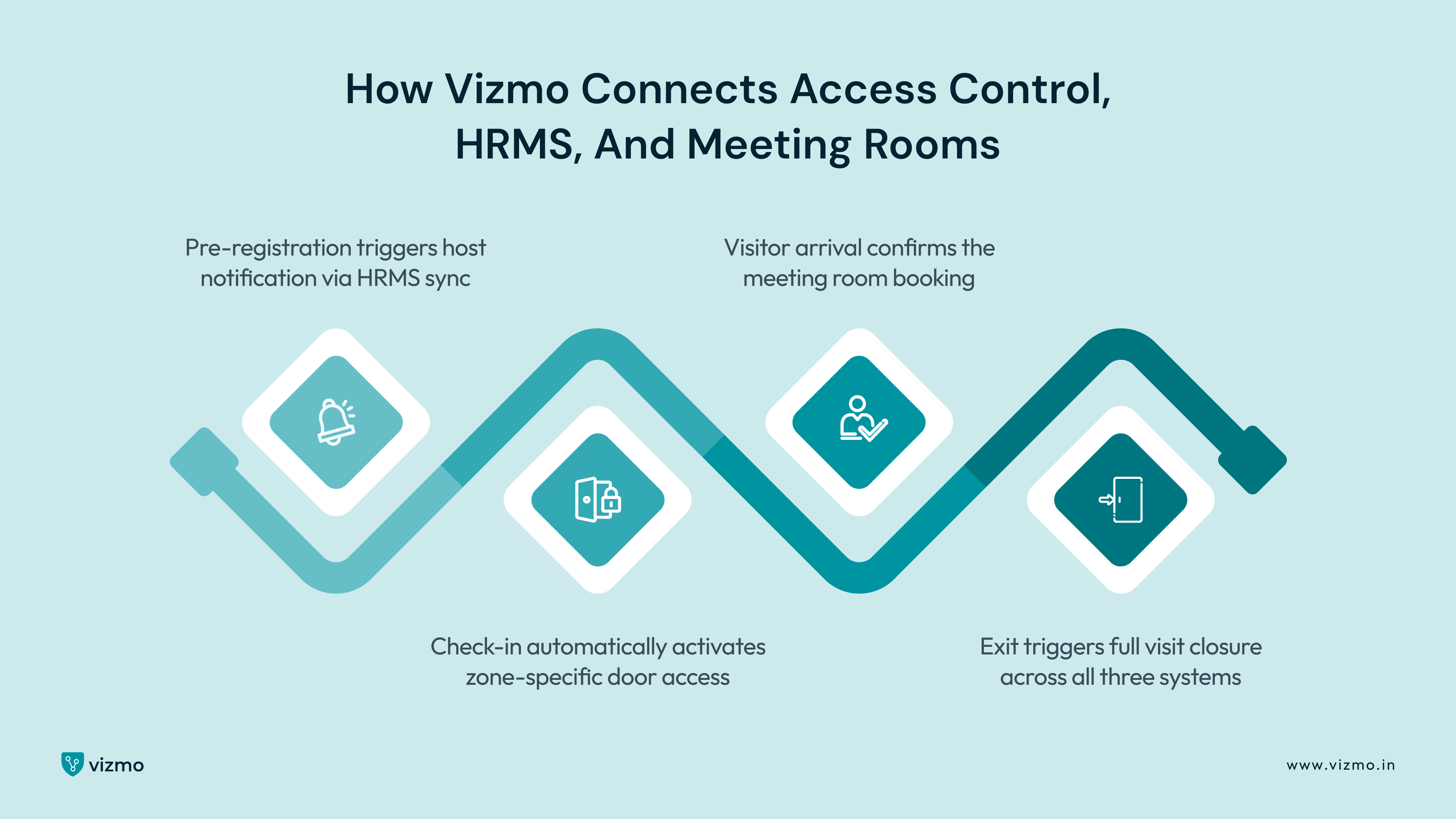
Pre-Registration Triggers Host Notification via HRMS Sync
When a visitor is pre-registered in Vizmo, the system pulls host details directly from the connected HRMS — Keka, Darwinbox, or equivalent — and notifies the right employee before the visitor arrives. No manual lookup, no front desk call. If the host is no longer on record in the HRMS, Vizmo flags the entry rather than proceeding with an outdated contact.
Check-In Automatically Activates Zone-Specific Door Access
When the visitor completes check-in, Vizmo sends an activation signal to the connected access control system — unlocking only the doors and floors the visitor is permitted to access. A client visiting the fourth-floor boardroom gets access to the lift lobby and floor four. Nothing else. No manual badge issuance, no security desk intervention. On exit, access is automatically revoked and the event is timestamped in the visitor log.
Visitor Arrival Confirms the Meeting Room Booking
Once check-in is complete, Vizmo confirms the linked meeting room booking. If the visitor does not check in within a configurable window — 15 minutes by default — the room is automatically released back into the pool. Ghost bookings caused by cancelled visits or no-shows stop accumulating, and meeting room inventory reflects actual availability in real time.
Exit Triggers Full Visit Closure Across All Three Systems
When the visitor checks out, Vizmo simultaneously revokes door access, releases any remaining room hold, and closes the visit record with a complete timestamp log — entry time, exit time, floors accessed, host, and purpose. That record is available immediately from the Vizmo dashboard without pulling data from three separate platforms.
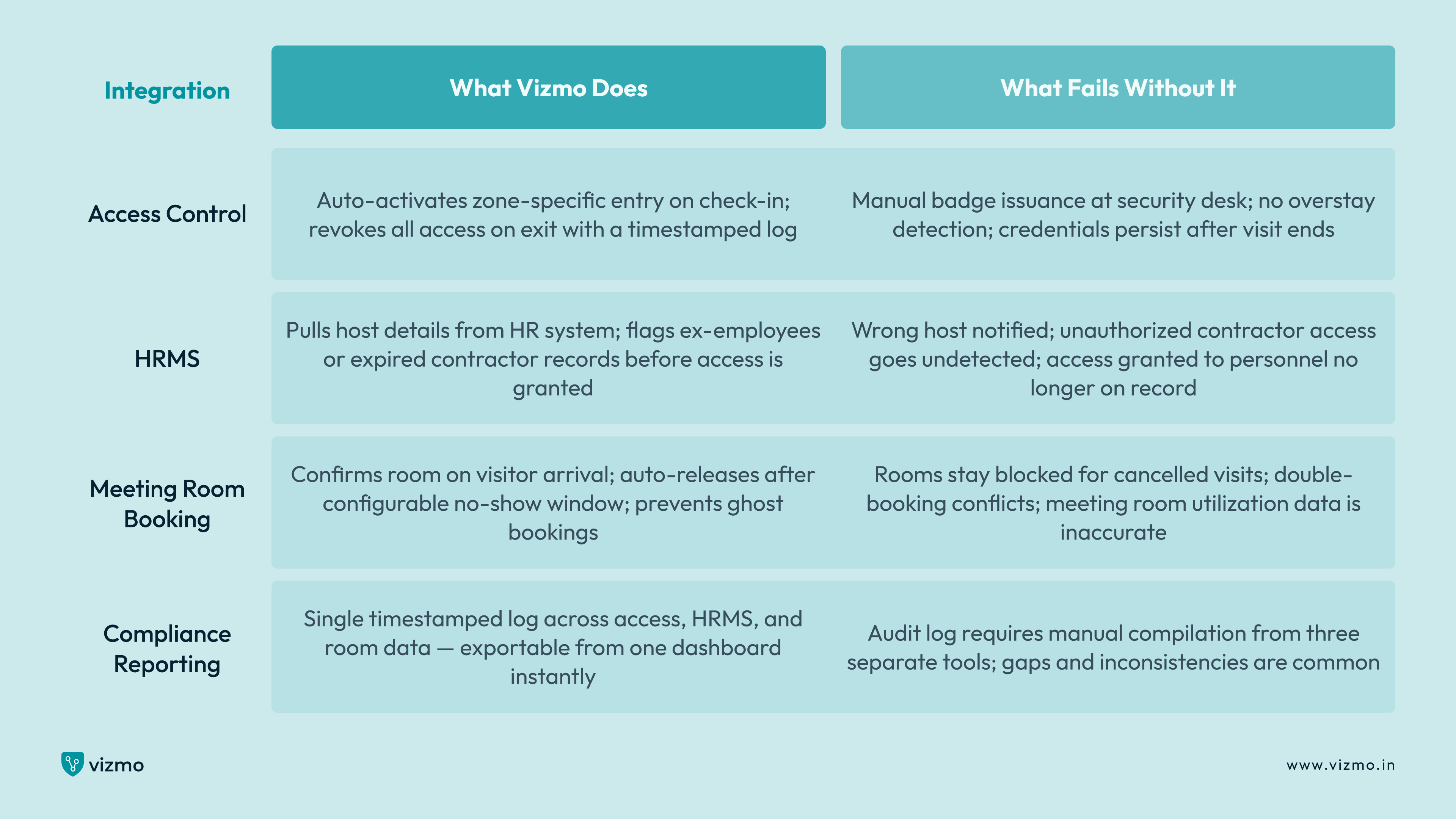
Integration Breakdown: What Connects, What It Does, What Breaks Without It
Real-World Example: IT Park, Bengaluru
A 1,200-employee IT park in Bengaluru with eight meeting rooms, three access-controlled floors, and 150+ daily visitors was running three tools with no connection to each other: a visitor sign-in tablet, a standalone access control system, and a meeting room booking platform.
The front desk called hosts manually on every arrival — averaging six minutes per visitor during peak hours. Meeting rooms stayed blocked an average of 45 minutes past cancellations because there was no automated release trigger. A security audit then flagged that two contractors whose engagements had ended four months earlier still had active access credentials, because revocation depended on a manual IT request that had never been submitted.
After deploying Vizmo Workplace with HRMS sync, access control integration, and the meeting room connector: host notification time dropped from six minutes to under 30 seconds. Ghost bookings reduced by 60% within the first month. Contractor access was auto-revoked on exit, and the full audit log was available in real time from the Vizmo dashboard. The next compliance review was completed in under two hours without any manual data compilation.
What Changes When Smart Visitor Management Software Is Running
- Front desk processing time drops from an average of five minutes per visitor to under 60 seconds — pre-registration and automated host notification remove every manual step at arrival
- Security teams can see every active visitor, their permitted zones, and their current location in the building from a single real-time dashboard — no phone calls to the front desk required
- HRMS sync ensures access is never granted to an employee who has left the organisation or a contractor whose engagement has ended
- Meeting rooms auto-release after a configurable no-show window, recovering capacity that would otherwise stay blocked for an hour by a cancelled visit
- Visitor access logs, room records, and HRMS data are consolidated into a single timestamped audit trail — ready for compliance review without any manual compilation
- Multi-location offices manage visitor check-in, access permissions, and room bookings across all sites from one dashboard, with consistent policies applied everywhere
What to Look for in Smart Visitor Management Software for Enterprise Offices
Not all visitor management software integrates at the same depth. These are the questions that separate a genuine integration from a surface-level connection:
- Does it integrate natively with your access control hardware, or does it require a third-party middleware layer that adds cost and a new point of failure?
- Can it pull host data from your existing HRMS — Keka, Darwinbox, SAP — without manual CSV imports or scheduled syncs that introduce lag?
- Does the meeting room sync work bidirectionally — confirming on arrival and releasing on no-show — or does it only push data in one direction?
- Does it support role-based access rules that distinguish between a first-time client, a recurring vendor, and a daily contractor — each with different zone permissions and time windows?
- Can it generate a combined visitor-access-room log that a compliance team can use directly, without exporting from three systems and reconciling manually?
- Does it support multiple floors and locations from one dashboard, with different policies per site while maintaining a single consolidated view?
Vizmo Workplace is built to meet all of these requirements — with native integrations for leading access control hardware and HRMS platforms used across Indian enterprises, and deployment support that includes integration configuration from day one.
In Short
- Smart visitor management software connects access control, HRMS, and meeting rooms so each step in the visitor journey triggers the next automatically — no manual coordination between systems
- HRMS sync ensures the right host is notified before the visitor reaches the desk, and blocks access for anyone no longer on the organisation's active records
- Meeting room integration prevents ghost bookings by auto-releasing rooms when visitors don't check in within the configured window
- Access control integration removes manual badge issuance entirely and revokes entry automatically on exit, with a timestamped record of every zone accessed
- The result is a single audit-ready log across all three systems — available in real time from one dashboard, without manual compilation before a compliance review
FAQs
- Does smart visitor management software work with existing access control hardware?
Yes, provided the software supports native integration with your hardware. Vizmo Workplace integrates with leading access control systems used in Indian corporate offices and IT parks, activating and revoking zone-specific door access automatically on check-in and exit — without requiring middleware or manual input from the security team.
- How does visitor management software connect with an HRMS like Keka or Darwinbox?
The integration works by syncing the employee directory from the HRMS into the visitor management platform. When a visitor is pre-registered, Vizmo pulls the host's details directly from the HR system, sends the notification to the right person, and checks whether that employee is still on active record. If the host has left the organisation, the system flags the entry before access is granted.
- Can meeting rooms be auto-released if a visitor doesn't show up?
Yes. Vizmo's meeting room integration monitors visitor check-in status against the linked booking. If the visitor does not check in within a configurable window after the meeting start time — typically 15 minutes — the room is automatically released back into the available pool, eliminating ghost bookings caused by cancellations that were never updated.
- What happens to a contractor's access when their visit ends?
When a contractor checks out, Vizmo sends an automatic revocation signal to the connected access control system, deactivating their credentials immediately. If a contractor has not checked out within the permitted time window, the system flags an overstay alert to the security team. Access does not persist beyond the authorised visit period without a deliberate extension.
- Is it possible to manage visitors across multiple office locations from one dashboard?
Yes. Vizmo Workplace supports multi-location visitor management from a single dashboard. Each site can have its own access policies, host directories, and room integrations while the central view gives facility managers and security teams a consolidated picture of visitor activity across all locations in real time.