What Is Desk Booking Software and Why Do Modern Offices Need It?

Introduction
Walk into most hybrid offices on a Tuesday and you'll see it: half the floor sitting empty while a handful of employees hunt for an open desk near their team. No one knows who's coming in on which day. Facilities teams are planning seating for a workforce that shows up differently every week. And the office lease still costs the same, whether the floor is full or half empty.
This is the exact problem desk booking software was built to solve.
For facility managers, admin heads, and HR teams running hybrid offices, the question isn't whether to formalize desk allocation — it's how to do it without adding another layer of complexity for employees who just want a seat to work from.
What Is Desk Booking Software?
Desk booking software is a digital tool that lets employees reserve a workspace in advance, see real-time desk availability, and lets facilities teams track how office space is actually being used. Instead of fixed seating or first-come-first-served chaos, employees check an app or dashboard, pick a desk that works for their day, and the system updates availability instantly for everyone else.
It's the layer of structure that makes hybrid work operationally manageable — without bringing back assigned desks.
Why Fixed Seating Doesn't Work for Hybrid Offices Anymore
Most offices didn't choose hybrid work because of a workplace strategy memo — it happened because employees started splitting their week between home and office, and seating plans built for five-day attendance stopped making sense.
Here's where that breaks down in practice:
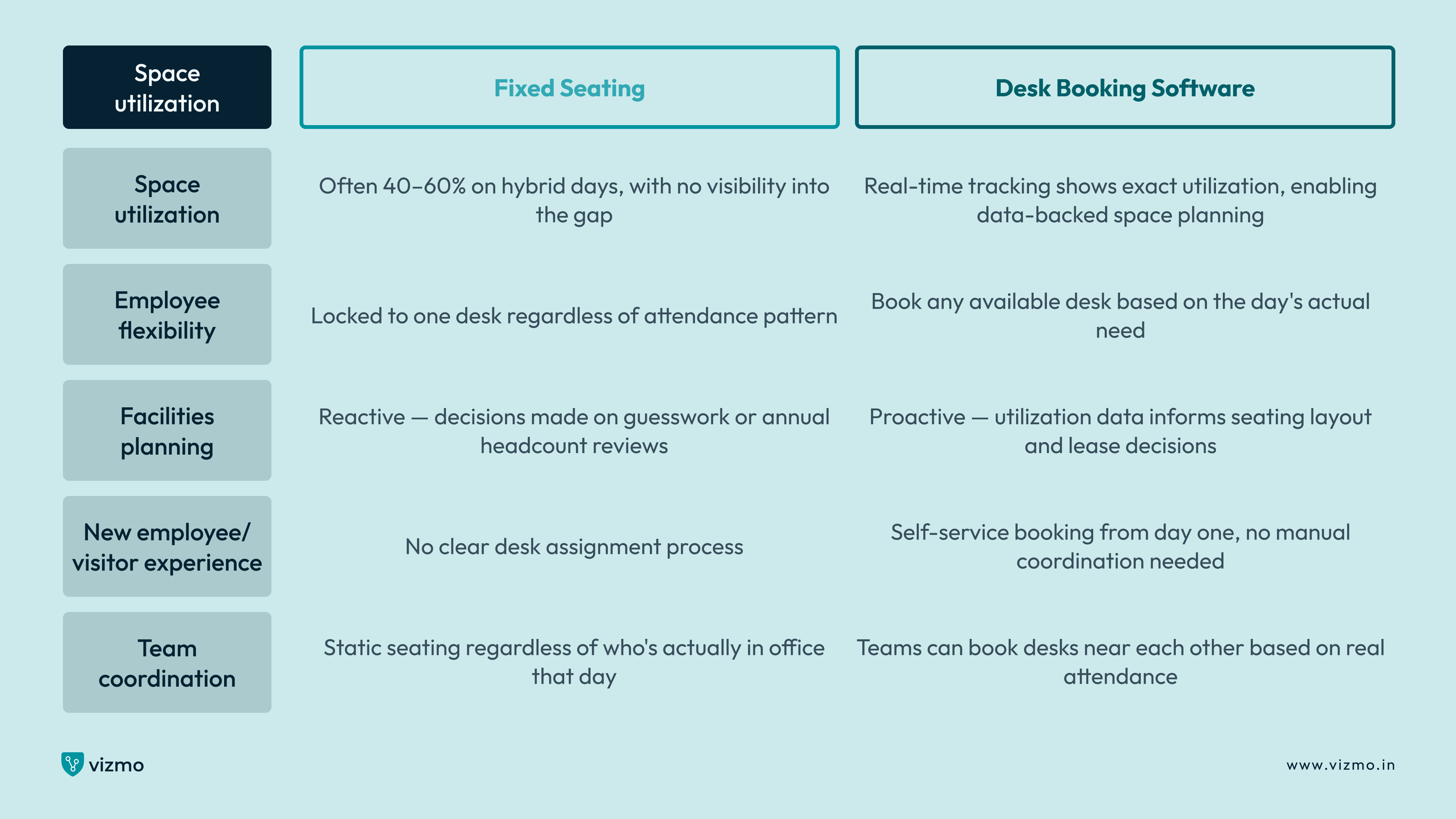
- A 200-desk floor sees only 90 people on a Monday and 180 on a Wednesday — fixed seating either wastes space or creates a scramble
- Teams that used to sit together are now scattered because their old fixed desks are occupied by people who came in that day
- Facilities teams have no visibility into actual occupancy, so they can't make a case for downsizing or reconfiguring space
- New employees or visiting team members from other offices have no clear desk to use when they do come in
- HR can't answer a simple question — how many people are actually using the office on any given day — without manually checking
A desk reservation system doesn't just solve the seating problem. It gives the organization the visibility it never had under a fixed-desk model.

How Desk Booking Software Works
The mechanics are simple by design, even though what it enables operationally is significant.
Employees Book a Desk in Advance
Through a desk booking app, employees see a live map of the office floor — which desks are free, which are booked, and which zones their team is sitting in that day. They reserve a desk for the day, half-day, or a recurring slot, and the system locks that desk for them.
Real-Time Availability Updates Automatically
As bookings happen, the system updates instantly. If someone cancels or doesn't check in within a set window, the desk releases back into the available pool — no manual tracking by the front desk or facilities team required.
Facilities Teams Get Utilization Data
Every booking, check-in, and no-show feeds into an analytics dashboard. Facilities and admin teams can see which days are busiest, which zones go unused, and where the office is over- or under-provisioned — data that's nearly impossible to get from a fixed-seating model.
Integration With Meeting Rooms and Access Systems
Most modern platforms connect desk booking with meeting room booking and building access control, so an employee's full day — desk, meeting room, building entry — is coordinated from one system instead of three separate ones.
Fixed Seating vs. Desk Booking Software
Real-World Example: Mid-Sized Tech Firm, Hyderabad
A 450-employee tech company in Hyderabad moved to a hybrid model with three mandatory in-office days per week. Under their old fixed-seating arrangement, the office was leasing for 450 desks but seeing an average daily attendance of just 210 people — and even then, certain zones were overcrowded while entire sections sat empty, because seating assignments hadn't been updated since the shift to hybrid work.
After deploying desk booking software, the company restructured its floor into flexible zones and let employees book based on actual need. Within two months, utilization data showed that 280 desks were sufficient to comfortably cover peak attendance days. The company released one full floor back to its landlord, cutting real estate costs while improving the in-office experience — employees could now book desks near their teams instead of sitting wherever a fixed plan placed them years earlier.
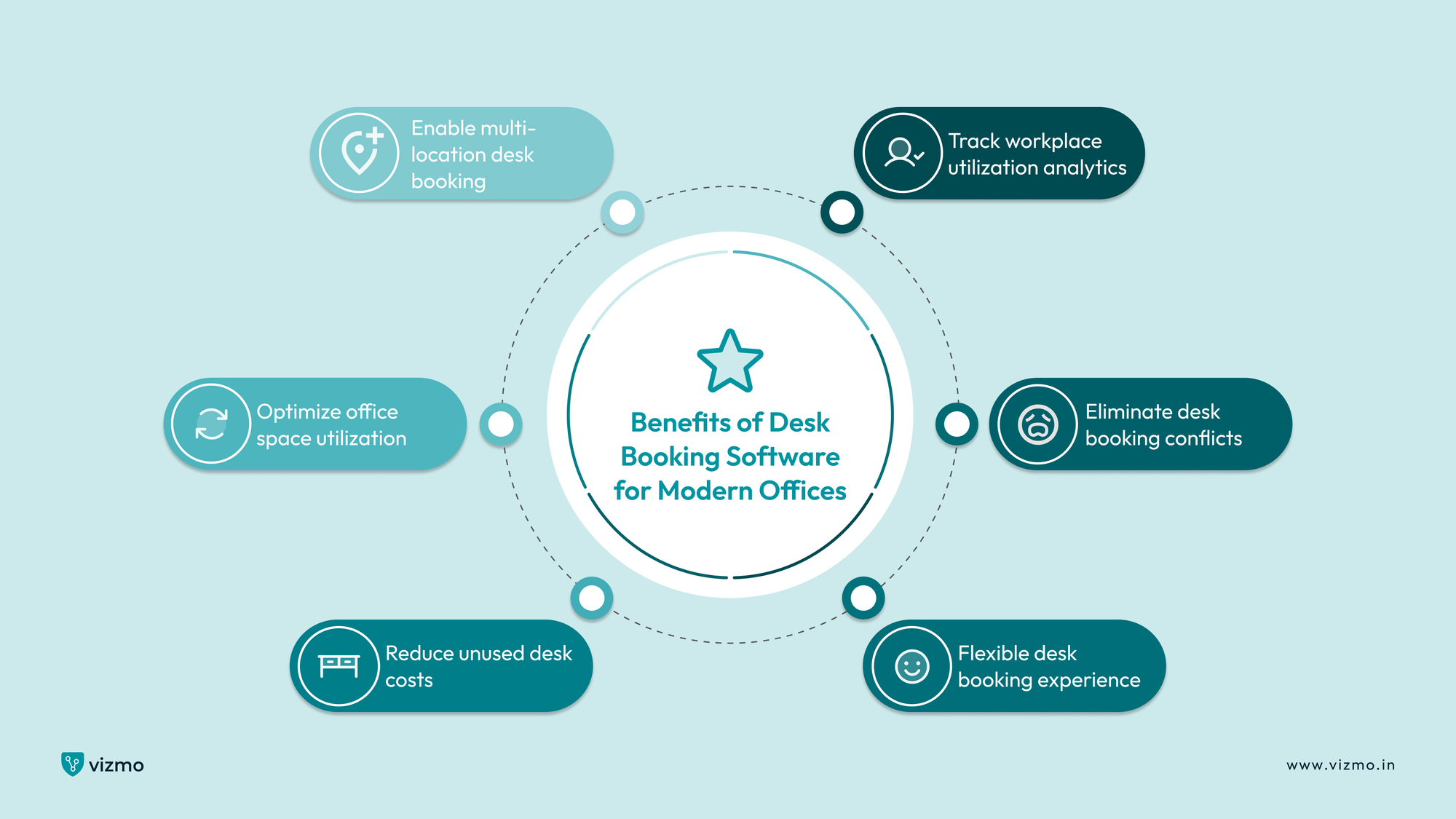
Benefits of Desk Booking Software for Modern Offices
- Improves office space utilization by giving facilities teams real, day-by-day data instead of assumptions based on headcount
- Reduces wasted desk space — and the real estate cost that comes with maintaining more desks than the office actually needs
- Gives employees the flexibility to book a desk that fits their day, including sitting near specific teammates or quiet zones
- Removes the morning scramble for a desk, since reservations are locked in advance
- Provides facilities and HR teams with attendance and utilization analytics without requiring a separate tracking system
- Supports multi-location offices by letting employees book a desk at any company site from the same platform
What to Look for in Desk Booking Software
Not every platform on the market is built for the same scale or complexity. Before choosing one, these are the questions worth asking:
- Does it show real-time desk availability, or does it rely on a static booking calendar that doesn't reflect actual usage?
- Can employees book recurring desks for set days of the week, or only single-day reservations?
- Does it integrate with meeting room booking and building access control, or will it operate as a disconnected tool?
- Can facilities teams pull utilization reports without manually exporting and reconciling data?
- Does it support multiple office locations from a single dashboard, for organizations with more than one site?
- Is the booking process simple enough that employees actually use it, rather than reverting to informal seating habits?
A desk booking system that answers yes to all of these does more than manage seats — it becomes the data layer that informs how an organization plans its real estate going forward.
In Short
- Desk booking software replaces fixed seating with a flexible system where employees reserve desks based on actual need, not a static assignment
- It solves the core hybrid office problem: matching available space to unpredictable, day-to-day attendance patterns
- Real-time availability and utilization data give facilities teams the visibility to make informed space and cost decisions
- Integration with meeting rooms and access control turns desk booking into one coordinated system instead of three disconnected tools
- Organizations adopting desk booking software typically uncover significant space inefficiencies that were invisible under fixed seating
FAQs
- What is desk booking software and how does it work?
Desk booking software is a digital platform that lets employees reserve a workspace in advance and view real-time desk availability across the office. Employees select an available desk through an app or dashboard, the system locks that reservation, and it automatically updates availability for everyone else. Facilities teams use the underlying data to track utilization and plan space accordingly.
- Why do modern offices need a desk booking system instead of fixed seating?
Hybrid work means daily attendance varies significantly — an office might see 40% attendance one day and 90% the next. Fixed seating either wastes space on low-attendance days or creates a desk shortage on high-attendance days. A desk booking system matches available space to actual demand, instead of assuming a fixed pattern that no longer exists.
- How does desk booking software improve office space utilization?
The system tracks every booking, check-in, and no-show, giving facilities teams accurate utilization data by day, zone, and team. This makes it possible to identify underused space, consolidate floors, or adjust seating layouts based on real attendance patterns — decisions that are difficult to make accurately without this data.
- Can desk booking software work across multiple office locations
Yes. Multi-location desk booking software lets employees book a desk at any company office from a single platform, which is particularly useful for organizations where employees travel between sites or where teams are distributed across cities.
- Does desk booking software integrate with meeting room booking?
Most modern platforms do. When desk and meeting room booking are integrated, an employee can plan their entire in-office day — desk, meeting room, and sometimes building access — through one system, rather than coordinating separately across multiple tools.